GPS tracking for business, straight from a phone
See the latest position, the route actually driven, the timing and the distance for every vehicle and operator on shift — from the GPS receiver in the phone, through the app. Nothing to fit, and no per-vehicle installation cost.
- Starts from the Excel files you already keep
- No per-vehicle hardware cost
- Keeps recording where there is no signal
How smartphone GPS tracking works
Smartphone GPS tracking reads coordinates from the GPS receiver already built into a smartphone and sends them to a central system while their shift is running. That gives you current position, route history, timing and real distance on one screen — with no GPS box wired into the vehicle and no per-vehicle installation fee.
- Who it covers
- Company vehicles, rentals and staff-owned cars — along with drivers, sales reps, technicians, delivery crews and field staff travelling by public transport.
- What has to be installed
- The MOBIX Field App on a smartphone, on Android or iOS. No installer appointment, no vehicle off the road, no wiring.
- When it records
- Recording starts when the operator starts work and stops when they finish. No location is collected outside working hours.
- How far back you can look
- 90 days of history on Starter, two years on Business and above. Operators can view their own history too.
Three reasons companies move to the phone
Most organisations are not short of location data. They are short of data that is complete and verifiable at the moment they actually need it.
Hardware never arrives in time
A GPS box needs an installer, a vehicle off the road and wiring per unit — so rentals and staff-owned cars usually end up outside the system entirely.
You see the vehicle, not the work
A vehicle’s coordinates tell you where it is. They do not tell you who is driving, which job they are on, whether the customer has been seen, or when it closed.
No evidence when it matters
When a dispute comes up over start times, overtime or an accident, data scattered across several files rarely answers what actually happened.
Compared with a GPS box fitted to the vehicle
Anyone shopping for vehicle tracking is already comparing hardware prices against a monthly fee. This compares what you get back from one journey instead — not device specifications.
- Cost to start
GPS box in the vehicleA device per vehicle, plus fitting
MOBIX 360 on the phoneNo device cost — it runs on the phone the operator already carries
- Installation
GPS box in the vehicleBook an installer, take the vehicle off the road, wire each unit
MOBIX 360 on the phoneInstall the app and start on the day the vehicle arrives
- Rentals and staff-owned cars
GPS box in the vehicleFitting a box to a vehicle you do not own is rarely possible
MOBIX 360 on the phoneCovers any vehicle, as soon as the operator starts work on it
- Who is driving
GPS box in the vehicleYou know where the vehicle is, not who is behind the wheel
MOBIX 360 on the phoneTied to the account that started work, so you get the vehicle and the person
- What they are working on
GPS box in the vehicleNo job data at all
MOBIX 360 on the phoneThe route is tied to the job, the check-ins and the time it closed
- Driving behaviour
GPS box in the vehicleNeeds a higher-spec unit with extra sensors, or a separate camera
MOBIX 360 on the phoneScored on every journey from GPS and the sensors already in the phone
- Cost and paperwork
GPS box in the vehicleLives in a different system from the location data
MOBIX 360 on the phoneCost per kilometre, fuel receipts, service intervals and Scope 1 carbon in one place
- Vehicles the law covers
GPS box in the vehicleA recorder certified by the Department of Land Transport
MOBIX 360 on the phoneCannot replace a legally mandated box — it runs alongside one, for the people and the work
That last row is a real limit, not modesty. A vehicle required to carry a certified recorder still needs it; MOBIX 360 runs alongside to answer the questions about people and work that a box cannot.
Four steps, from setup to evidence
The same sequence works for every team, whether they drive a company vehicle or travel in their own car.
- 01
Import your data and install the app
Bring in the vehicle register and employee records from Excel, with line-by-line validation, then install the app for the operators.
- 02
Start work before setting off
The system begins recording position, route, timing and distance the moment work starts — and shows the operator that recording is running.
- 03
The control room sees everyone at once
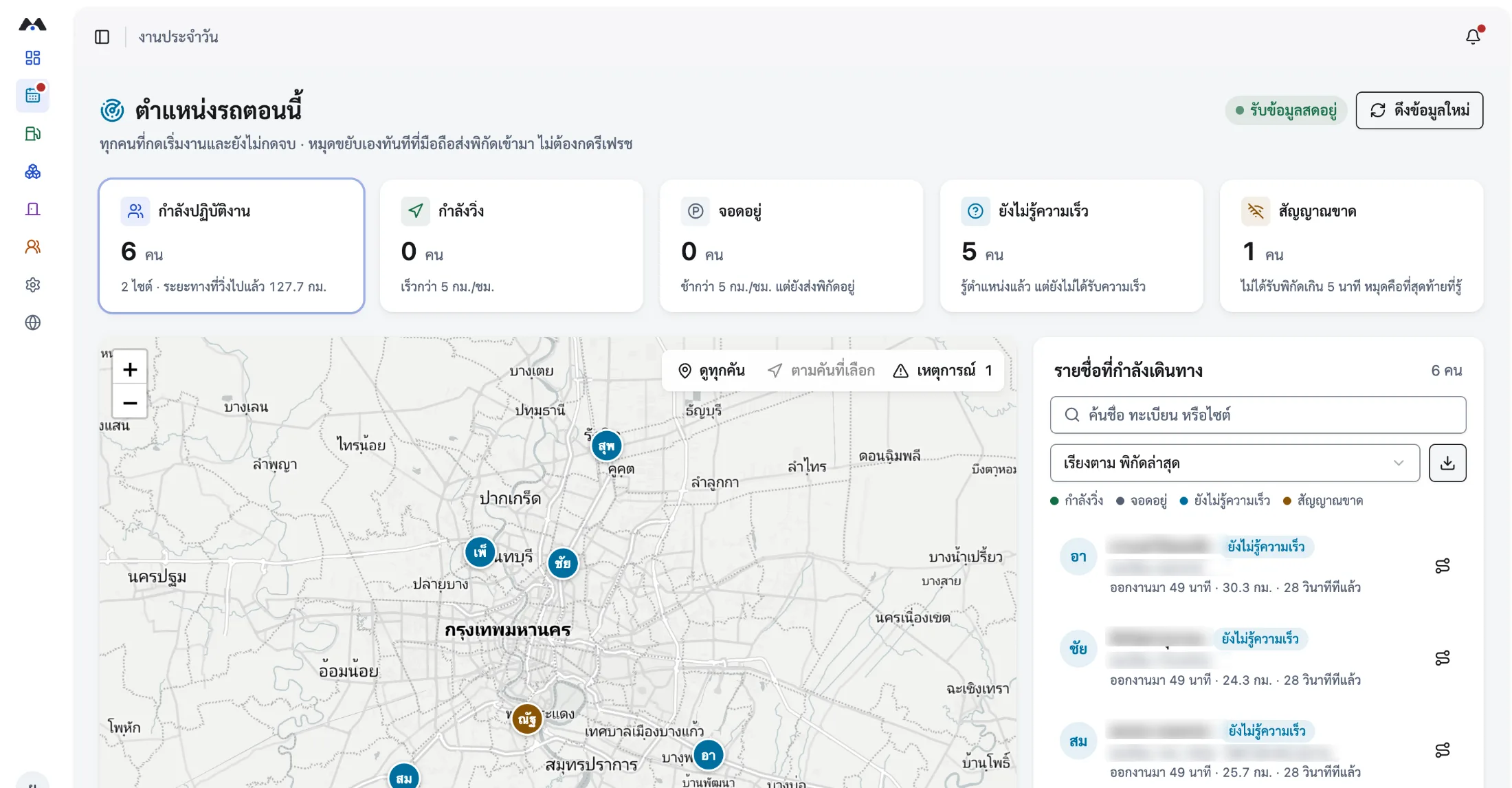
Supervisors see the latest position of everyone currently working on one map, with travel status and running distance for each of them.
- 04
Finish work and the evidence is already there
On finishing, the system summarises the route driven, start and end times, distance and any risk events — auditable line by line.
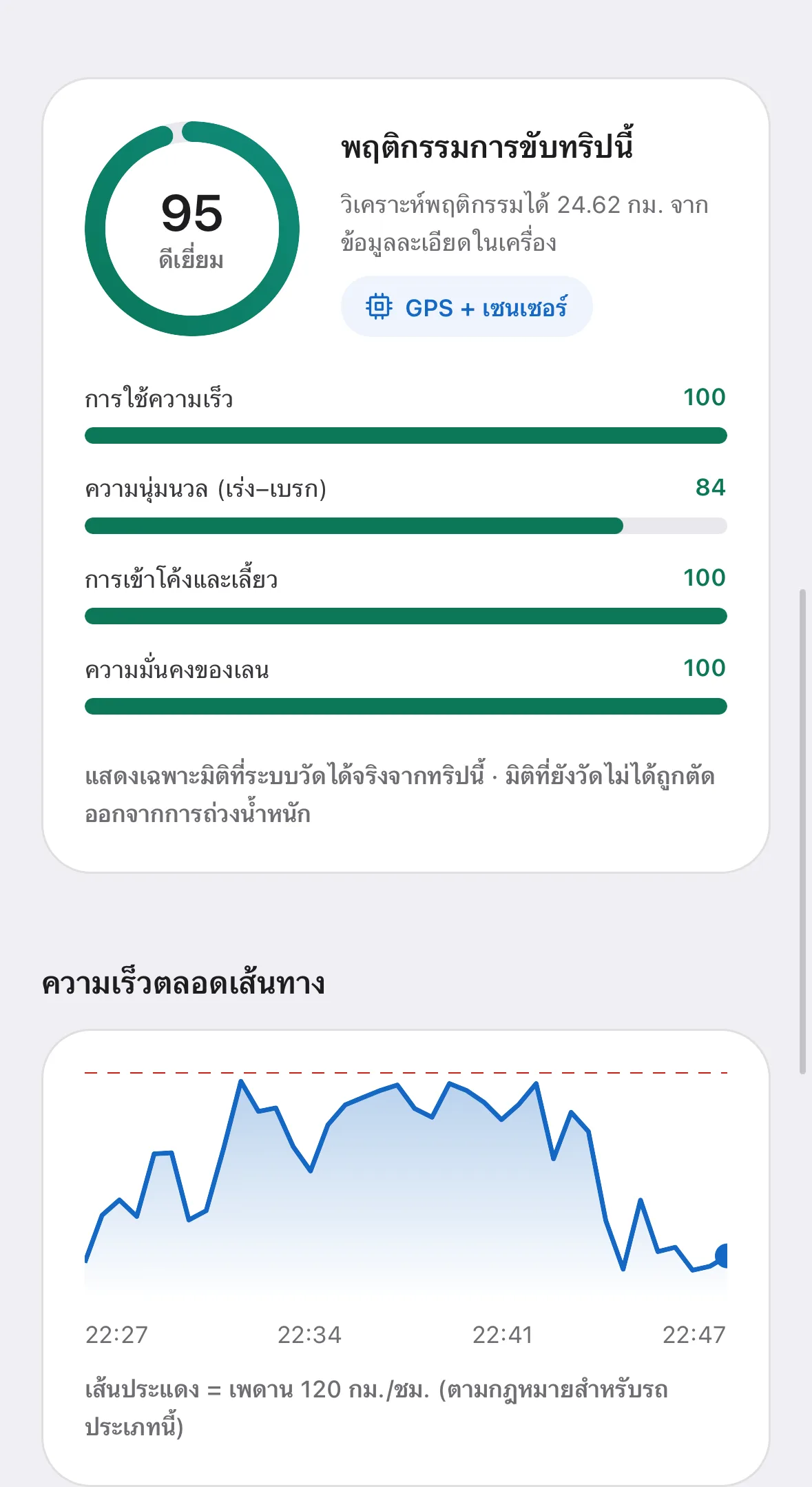
What the system captures on every trip
All of it comes from one phone. No extra hardware, and nothing for staff to fill in after the fact.
- Latest position of everyone on shift, with the accuracy margin of each fix
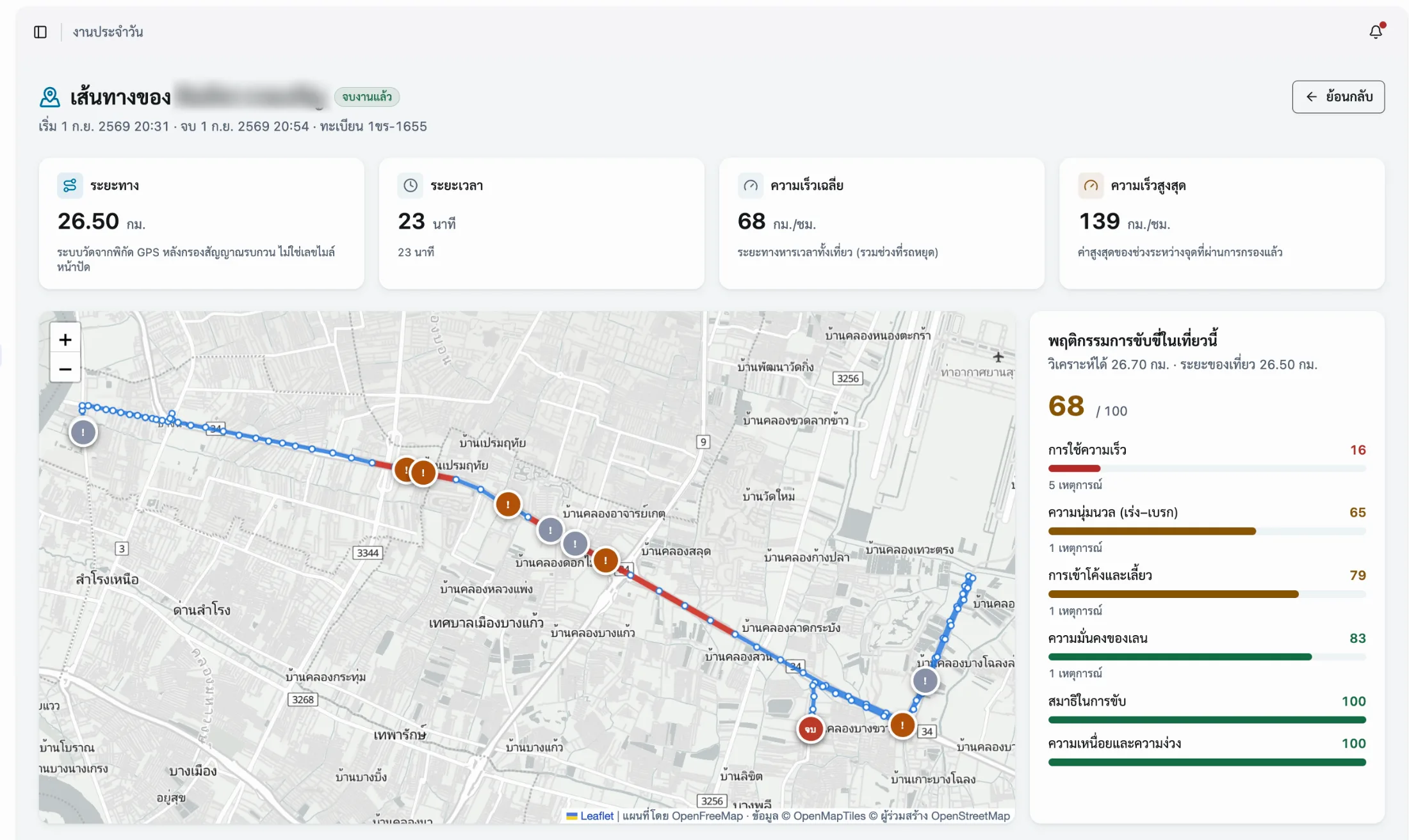
- Route history on a map, with the real timing and distance of each trip
- Average and top speed for every journey
- Where risk events happened while driving, with six behaviour scores
- Automatic start and end times, with distance, for overtime claims
- Recording continues with no signal and syncs when the connection returns
One trip — route, timing and behaviour, all auditable
Frequently asked questions
The questions our team hears most about GPS Tracking — from operations, HR and IT.
01Is phone GPS as accurate as a fitted GPS box?
Coordinates come from the same class of GPS receiver used in navigation devices, and the system records the accuracy margin of every fix so you can judge the data quality yourself. The real difference is not precision but coverage: a hardwired box draws vehicle power and reports even with nobody aboard, while a phone reports while the operator is on shift — which is what field operations management actually needs.
02How is this different from sharing a location in a chat app?
Sharing a location in a chat app shows where someone is at that instant. There is no route history, no distance or duration totalled up, and no link to a job — so none of it works as evidence later. A GPS tracking system records route, timing, distance and check-ins against each individual job, with access rights split by department.
03What do we need to prepare before starting?
Your vehicle register and employee records as Excel files. The system imports six file types with a validation screen that reports errors line by line before anything is saved. After that you set administrator permissions and have operators install the app and start work. Larger organisations can sync employee data through their ERP and sign in with Microsoft 365.
04Can we watch several people and vehicles at once?
Yes. Supervisors see everyone currently working on one map with each person’s travel status and running distance, and can open any trip to see its route, timings and risk events.
05Where is location data stored, and who can reach it?
Data is held on MOBIX systems managed to ISO 27001 and ISO 27701. Access is governed by administrator permissions split by department, operators can view their own history, and each organisation should decide who has access and state it in its privacy notice before rollout.
Related solutions
- Driver MonitoringSix driving behaviour scores from GPS and the phone’s own sensors — no camera or hardware to fit.
- Fleet ManagementRun company vehicles end to end — documents, servicing, per-vehicle cost and incidents in one system.
- Delivery TrackingSee where delivery vehicles are, the status of every job, and the time and coordinates of each drop.
Start tracking vehicles and people from the app
Book a live walkthrough. We will show you the same screens your team would use, with data close to your real operation.