Track vehicles, people and field work in real time — from a phone
MOBIX 360 brings GPS tracking, fleet management and mobile workforce tracking into one system. Follow vehicles, drivers, sales reps, technicians, delivery crews and any staff working away from the office — with no GPS hardware to install.
- In daily use at a publicly listed group
- Works on both Android and iOS
- ISO 27001 / ISO 27701 certified
One real trip, and everything the system recorded from it
- No GPS box to fit — it all runs from the app
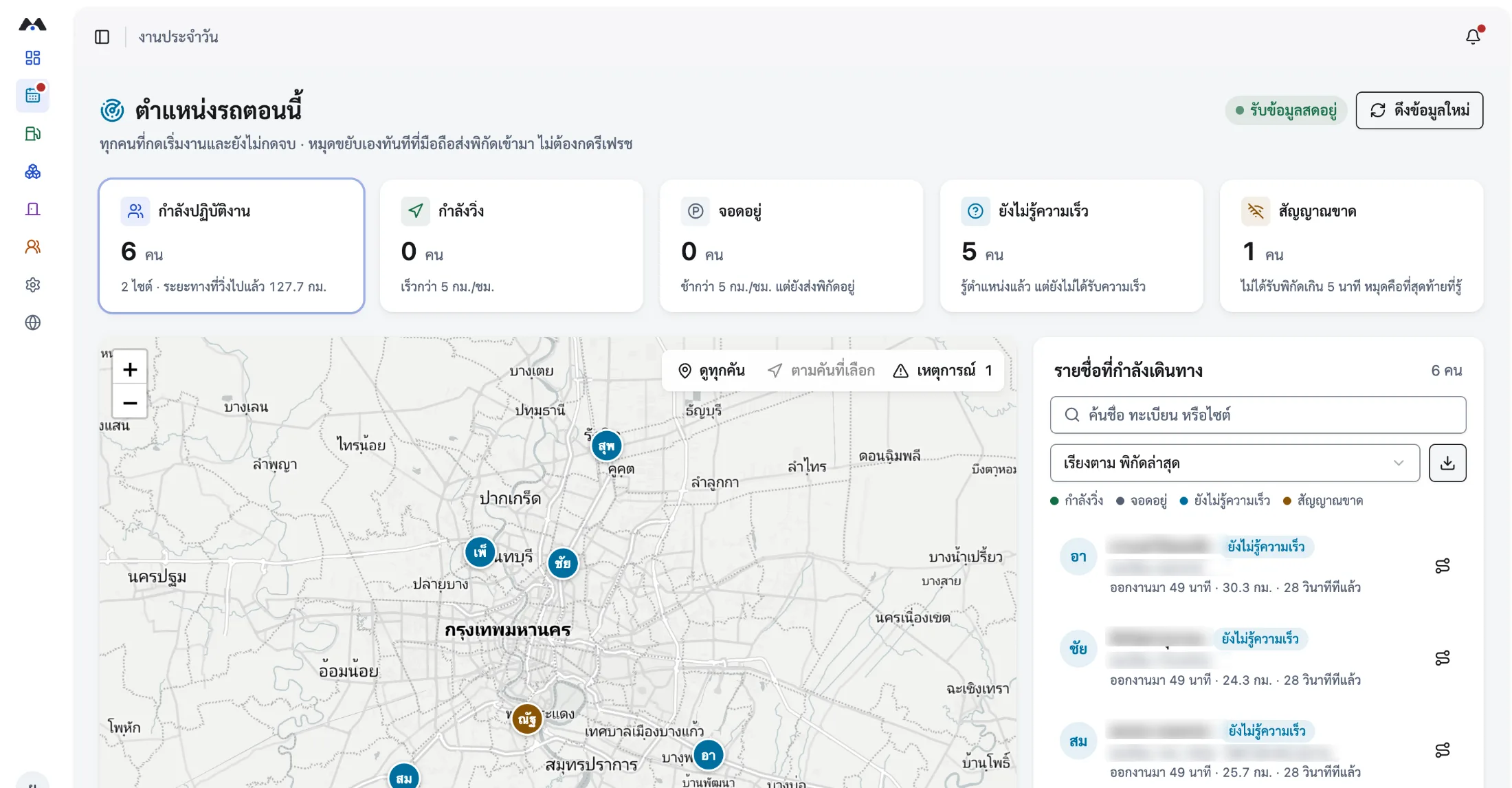
- Live position and the route actually driven, in real time
- Look back at the proof of work from every trip
Three core capabilities, one system
From seeing positions in real time through to running vehicles and field work — all off the same set of data.
GPS tracking from a smartphone
Follow location, route, timing and work status in real time through a phone — no GPS box to fit.
- See where everyone who has started a shift is right now
- Replay routes with the real timings and distances
- Keeps working where there is no mobile signal
Fleet Management
Run the company fleet end to end — vehicle requests, paperwork, servicing, per-vehicle cost and incidents, in one system.
- Request, approve and assign vehicles on one board
- Advance warnings for expiring documents and service intervals
- Cost per vehicle and cost per kilometre
Mobile Workforce
Manage sales teams, technicians, delivery crews and field staff with job tickets, routes, check-ins and proof of work.
- Check in on site with the real time and coordinates
- Tie the route actually driven to the job ticket
- Start and end times recorded automatically
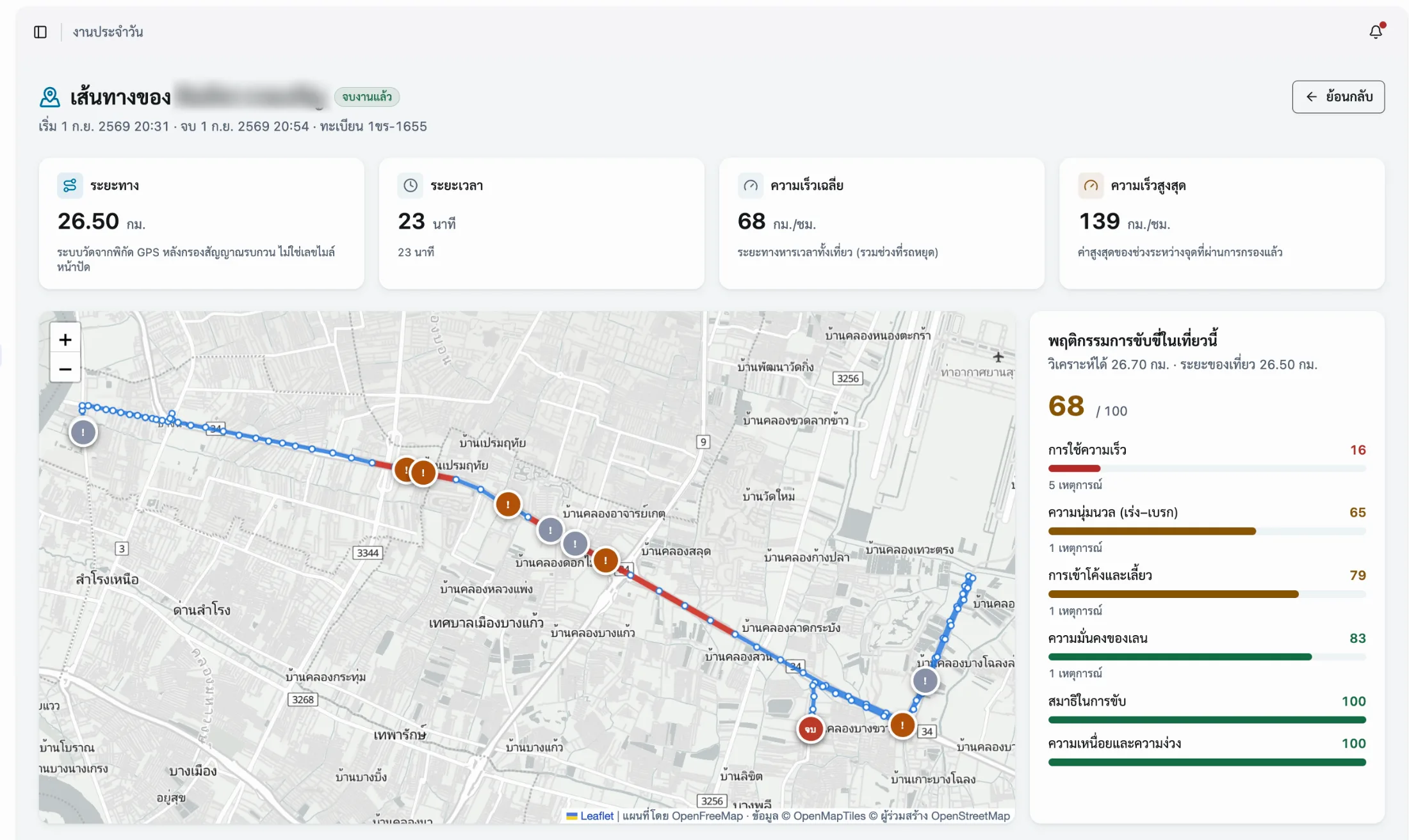
One trip, one record, auditable line by line
Control how the work is done, and the losses stop compounding
A single accident rarely ends at the repair bill. It means damaged goods, injured passengers, a vehicle earning nothing while it sits, penalties for late delivery, and credibility you do not get back. All of it accumulates from driving behaviour nobody was watching.
- 01
Six risk behaviours detected automatically
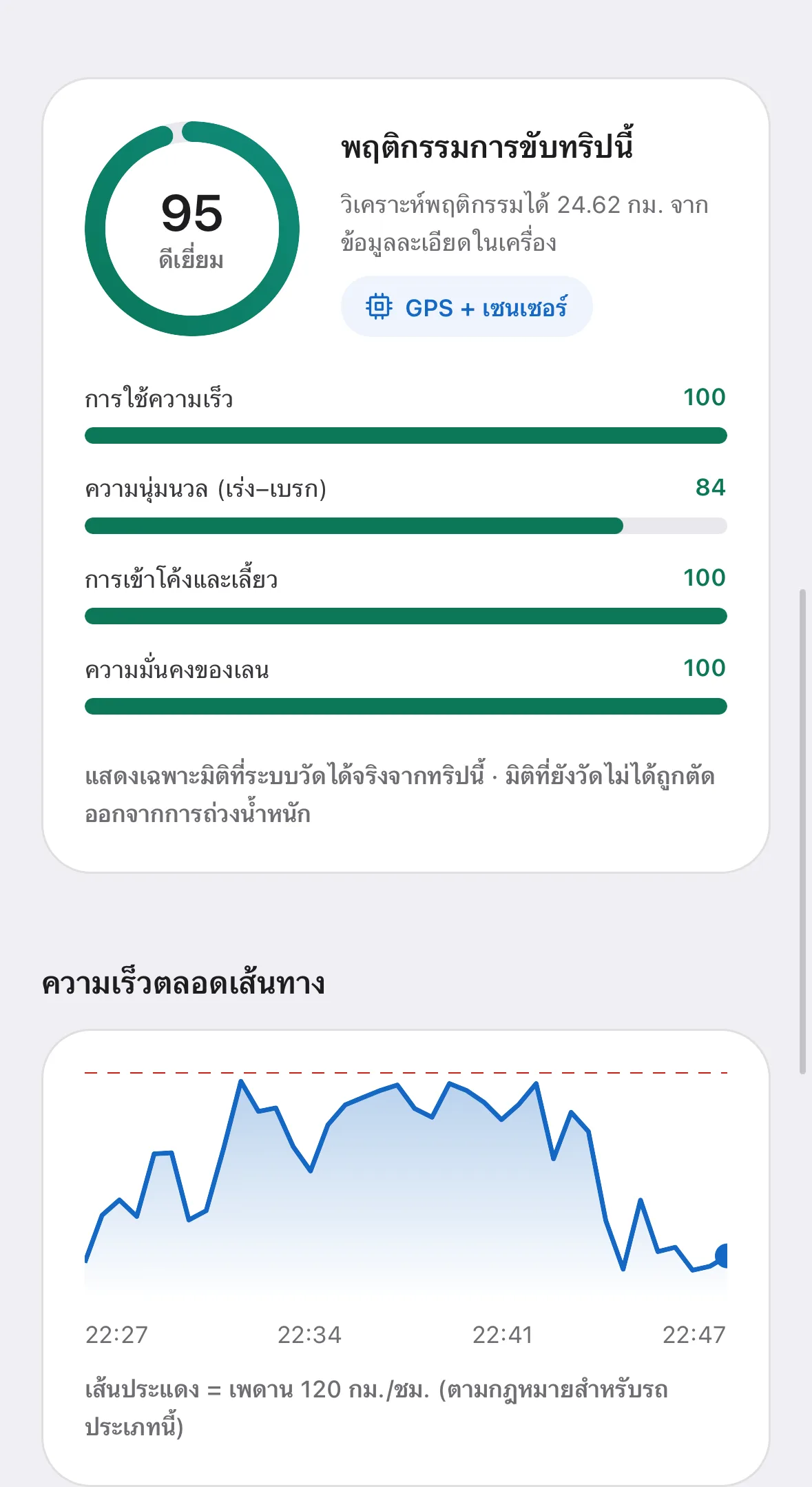
This is the driver monitoring system (DMS) layer: harsh acceleration, heavy braking, aggressive cornering and lane weaving are recorded and classified as they happen — with no extra hardware fitted to the vehicle.
- 02
Alerts only when it genuinely matters
The operator is warned at the moment of real danger so the behaviour can change mid-shift, rather than being nagged until the warnings stop registering.
- 03
One-tap emergency assistance
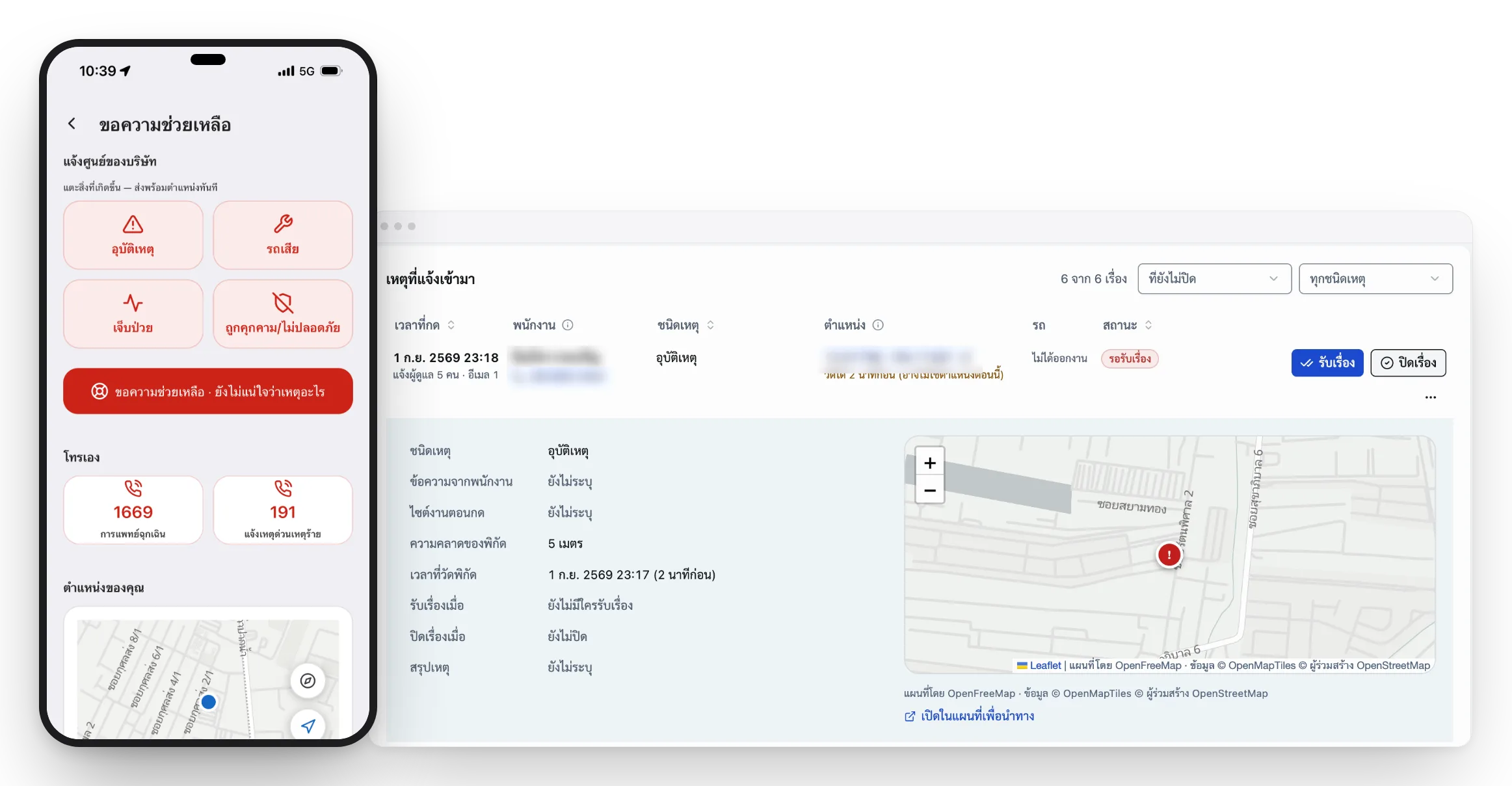
Sends the operator’s position to the control room in a single tap, alongside national emergency numbers, the company’s own numbers, and the nearest hospitals and police stations — all dialable even with no internet connection.
Make work done off-site auditable at every step
Once staff leave the office, management should still be able to answer who is where, what they are working on, and when it was finished — without ringing round and without waiting for a month-end report.
- 01
Confirmed arrivals and departures
Operators scan their personal QR code on site to record the real time and coordinates. The same flow covers arriving at a site, meeting a customer and dropping off a delivery.
- 02
The route driven, tied to the job
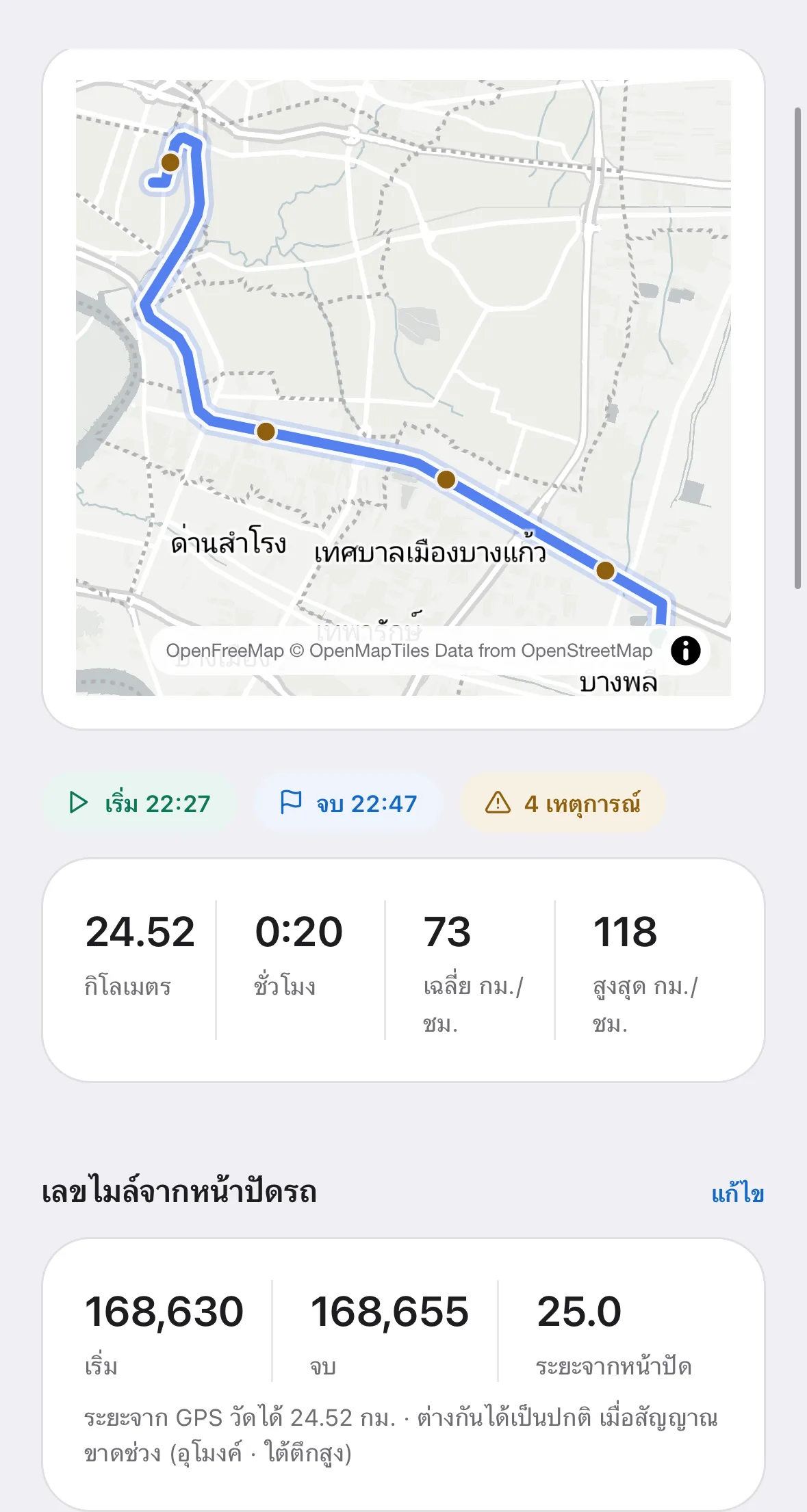
Compare the actual route against the assignment, so travel can be reconciled with the work the company is paying for.
- 03
Working hours captured automatically
Time counts from the moment work starts to the moment it ends, with the distance alongside it — an overtime record both sides can trust.
When someone calls for help, the control room sees their position and can accept the case immediately.
For every team that works away from the office
The same feature set adapts to company vehicles and to teams travelling out to customers. No second system to buy.
Fleet & Driver
Company vehicles and drivers
Problem: Scattered documents, no cost per km
Track vehicles and drivers, analyse driving behaviour, and manage cost, documents and servicing.
See the Fleet Management solutionField Sales
Field sales teams
Problem: Visit reports that prove neither where nor when
Confirm customer visits with time and coordinates, plan call cycles, and review routes after the fact.
See the Sales Tracking solutionField Service
Technicians and on-site work
Problem: No way to tell if the technician has arrived
Assign jobs to technicians, follow their travel, check in on site, and capture start and end times.
See the Field Service solutionDelivery
Delivery operations
Problem: No arrival time without calling the driver
Follow drivers, vehicles, routes, drop points and job status in real time across the whole delivery cycle.
See the Delivery Tracking solutionField Staff
Field staff
Problem: No idea who is where, no proof of hours
Check in away from the office, record working hours, run site inspections and keep an auditable history.
See the Mobile Workforce solution- Talk to us
Custom
Not seeing your team?
Tell us how your team works and we will put together the feature set that matches your actual process.
Run company vehicles — status and cost — on figures that hold up
Turn scattered paperwork and spreadsheets into one auditable system: readiness before dispatch, maintenance cost per vehicle, and incidents through to claims.
01 / Dispatch & compliance
Check readiness before a vehicle leaves the yard
Every trip should start with a roadworthy vehicle and valid paperwork, so the system checks the conditions that matter before the job is released — cutting legal exposure and work that has to be done twice.
- 01
Request and assign in one place
Staff request a vehicle online, approvals follow the reporting line, and several requests can be merged into a single trip on the dispatch board to stop vehicles running empty.
- 02
Screen the vehicle before dispatch
The system flags it immediately if that vehicle has lapsed insurance, expired compulsory motor insurance, or a clashing booking — before the job ticket is issued.
- 03
Paperwork you can look back on
Renewing a document creates a new version rather than overwriting the old one, so previous years’ costs and premiums stay intact.
- 01
02 / Vehicle maintenance
Turn emergency repairs into planned budget
From the first report through budget approval to closing the work order, every step is planned and auditable — so a small expense does not quietly become a large loss.
- 01
Report a fault by scanning a QR code
Each vehicle carries its own QR code. Anyone who spots a problem can scan it, attach a photo and report it — no user account required.
- 02
Work orders that hold up to scrutiny
Labour and parts are itemised separately, approvals follow spending limits, and the total locks the moment the job closes. Corrections require a new document.
- 03
Automatic service intervals
Set intervals by actual odometer reading or by elapsed time, whichever comes first. The system warns ahead of time and calculates the next interval from the service history.
- 01
03 / Fleet economics & incidents
See the real cost per vehicle and decide on the numbers
Repairs, distance, anomalies and claim values in one picture — so it is clear which vehicles earn their keep, which are a drag, and when one should be retired.
- 01
Cost per kilometre, per vehicle
Know what each vehicle costs per kilometre, which ones come in for repair most often, and where repair costs have spiked out of pattern.
- 02
Actuals kept separate from estimates
Closed amounts and estimates are never mixed. A vehicle with no work order yet is not counted as costing nothing.
- 03
Incidents linked to insurance claims
Attach the incident report to the work order and follow the claim with the insurer until the case is closed.
- 01
ESG data an auditor will accept
A credible ESG report needs a base of data that can be traced backwards. MOBIX turns fuel receipts and day-to-day field operations into E-S-G figures ready for a 56-1 One Report filing.
E Environment
Environment and energy management
- 01
Calculated to Thai TGO standards
The biogenic share of biodiesel and ethanol is separated from the Scope 1 total in line with international practice. Eight fuel types are supported.
- 02
Fuel receipts read by AI
Figures are read off the receipt, totals are checked for consistency, and the taxpayer number is locked from the original document — so the carbon base data holds up.
- 03
The hidden cost of idling
Idle time is split into three bands and converted into the money the company would save by switching the engine off.
- 01
S Social
People and workplace safety
- 01
Safety statistics across the organisation
An average behaviour score across all operators, used to set targets and measure whether the safety standard is actually rising.
- 02
Figures that compare fairly
Measured as risk events per 100 kilometres, so months with very different mileage can still be compared honestly.
- 03
Transparent pre-shift screening
Shows what proportion of shifts began with a fitness-to-work check — evidence of duty of care.
- 01
G Governance
Governance and data credibility
- 01
Emission factors keep their history
When TGO publishes new carbon factors, the system gives them an effective date instead of overwriting the old ones — so last year’s report does not change retroactively.
- 02
Every figure has a traceable source
Shows what percentage of the carbon total is backed by receipts. Unapproved receipts are excluded from the count.
- 03
Gaps in the data are called out
Shows how many trips have incomplete odometer readings and which vehicles still have no fuel type recorded, so data quality is visible before the report is written.
- 01
Sources:TGO emission factors for organisations (CFO)GHG Protocol Corporate Standard (Scope 1 definition)
Pay for what you use — from SME to listed enterprise
Every plan is counted by field operator, whether that is a driver, a sales rep, a technician or any other member of field staff.
Pay annually and save up to two months
Starter
For single-site businesses beginning the move to digital
฿1,290/ month
Starting at 10 operators
or from ฿1,590 / month for 5 vehicles
Additional operator ฿159 · additional vehicle ฿390
Create a company accountWhat you get
- MOBIX Field App for operators — start and end work, check in, and an assistance button
- Vehicle register with document renewal reminders
- Fault reports, work orders and service intervals
- 90 days of history
- Three administrator seats
- Recommended
Business
For multi-site organisations that need full cost control and no leakage
฿3,900/ month
Starting at 40 operators
or from ฿5,900 / month for 25 vehicles
Additional operator ฿109 · additional vehicle ฿290
Book a live demoEverything in Starter, plus
- AI receipt checking to reclaim VAT on fuel
- Scope 1 carbon calculated to Thai TGO methodology
- Personal QR check-in and check-out on site
- Dispatch board with 13 pre-departure warnings
- Repair approvals by spending limit, and cost-per-kilometre analysis
- Two years of history and 15 administrator seats
Enterprise
For large organisations integrating existing systems and bespoke configuration
Custom
Scoped to your operation
No cap on operators or vehicles
Talk to salesEverything in Business, uncapped, plus
- Employee records and org structure synced from your ERP
- Sign in with Microsoft 365 company accounts
- Enterprise API into accounting and inventory systems
- Shared master data across the whole group
- A specialist team to handle rollout and data migration
Around ฿129 per operator per month to start
Based on the Starter plan at ฿1,290 a month for 10 operators — less than a day’s wages, spent on closing fuel-receipt leakage, reducing accident risk, and recovering VAT the company was otherwise writing off.
Frequently asked questions
Answers for management, operations, HR and IT — from getting started through to PDPA.
01What is MOBIX 360?
MOBIX 360 is business software (SaaS) from Siamrajathanee Public Company Limited, a company listed on the Stock Exchange of Thailand. It tracks vehicles, drivers, sales reps, technicians, delivery crews and field staff through an app on a smartphone, combining GPS tracking, fleet management and mobile workforce management in one system. MOBIX 360 is not a hardware device, not a GPS box and not a phone holder — it is a software platform used through a browser and a mobile app, on both Android and iOS.
02Who makes MOBIX 360?
MOBIX 360 is a product of Siamrajathanee Public Company Limited, an outsourcing services provider listed on the Stock Exchange of Thailand, based at 329 Moo 10, Samrong, Phra Pradaeng, Samut Prakan. Information security is managed to ISO 27001 and ISO 27701. Contact +66 83 082 4588 or LINE @mobix-360.
03What is GPS tracking and how does it work?
GPS tracking means following the position of a vehicle or a person continuously: coordinates are read from satellites and sent to a central system that shows the current location and the route taken. MOBIX uses the GPS receiver already in the smartphone and sends coordinates once they start their shift, so location, route, timing and job status all appear on one screen.
04Can a phone replace a GPS box fitted to the vehicle?
For tracking people and work, yes. A smartphone provides position, route, speed and driving behaviour without any installation and without a per-vehicle fitting cost. The difference is that a hardwired GPS box draws power from the vehicle and reports even with nobody in it, while a phone reports once the operator starts work — which is closer to what field operations management actually needs.
05Can we track vehicles without fitting a GPS box?
Yes. You can start immediately with the app on a smartphone — no appointment with an installer, no vehicle off the road for wiring, and no upfront hardware spend. That suits organisations running a mix of company vehicles, rentals and staff-owned cars.
06What is the difference between GPS tracking and fleet management?
GPS tracking answers where a vehicle or person is and what route they took. Fleet management covers the whole cycle: requesting a vehicle, dispatching work, documents and insurance, servicing, cost per vehicle, and incidents and claims. MOBIX provides both in one system, so location data feeds directly into managing cost and risk.
07How do you track sales staff through a phone?
The rep starts their shift in the app before setting off. The system records the route, timing and distance for the whole journey, and when they reach the appointment they check in, recording the time and coordinates of the visit. Their manager sees the planned calls, the visits that actually happened, and the route history on one screen.
08How do we know a sales visit really happened?
Checking in on site records the time and the coordinates at that moment, along with the accuracy margin, and links them to the assigned job. Compared against the route actually driven, that confirms where and when the visit took place — with no self-reporting involved.
09Does tracking staff comply with Thailand’s PDPA?
Tracking staff location is permitted where there is a lawful basis, a clearly defined purpose, data minimisation, and advance notice to employees. MOBIX is designed to record coordinates only between the moment an operator starts work and the moment they finish — never outside working hours — and lets operators view their own history. Each organisation should have its legal team or data protection officer review its notices and policies before rollout.
10Can tracking be limited to working hours only?
Yes, and that is the default. Recording begins when the operator starts work and stops when they finish. No location is collected outside those periods.
11How is GPS sales tracking different from asking staff to self-report?
Self-reporting cannot prove where or when something happened. MOBIX records the route, timing and coordinates from the app while their shift is running, then links each check-in to a job. Managers can compare the plan against what actually happened straight away, and reps do not have to write up reports after the fact.
12How does real-time delivery and driver tracking work?
MOBIX delivery and driver tracking run from the app on a phone. Once they start work, coordinates stream to the control room, so supervisors can see where the vehicle is, what route it took, whether it has reached the drop point, and the status of each job — with the time and coordinates of every check-in kept for later review.
13How does the system help assign and follow technicians?
A supervisor assigns job tickets to individual field technicians. Each technician sees their own jobs in the app, starts work to begin recording travel, checks in on arrival, and closes the job when finished. That produces start and end times for every job, travel duration and location evidence — everything needed to plan the next round of resourcing.
14Is data lost when working somewhere with no signal?
No. The app is built offline-first. With no internet connection it stores coordinates and travel history on the device, and operators can still start work, finish work and call for emergency assistance as normal. Everything syncs automatically once signal returns.
15Is rollout difficult for an organisation with many vehicles and staff?
The system imports six types of Excel file, including the vehicle register and employee records, with a validation screen that reports errors line by line before anything is saved. After that you set administrator permissions, and operators install the app and start work. Larger organisations can sync employee data through their ERP and sign in with Microsoft 365 accounts directly.
16How does the system support ESG reporting and Scope 1 carbon?
It turns fuel receipts and day-to-day field operations into E-S-G figures that trace back to source documents. For E, Scope 1 carbon is calculated from the fuel actually purchased multiplied by the emission factors published by Thailand’s Greenhouse Gas Management Organization, covering eight fuel types and separating the biogenic share of biodiesel and ethanol from the headline total. For S, the average behaviour score and the rate of risk events per 100 km. For G, emission factors are given effective dates rather than being overwritten, so last year’s report never changes retroactively. The output feeds a 56-1 One Report filing directly.
17How does fuel VAT recovery work?
AI reads the figures off each fuel receipt, checks the totals for consistency, and locks the taxpayer number from the original document — so you can tell which receipts carry enough documentation to reclaim VAT and which are missing information. Organisations that had been letting large volumes of fuel receipts pass unclaimed can see the shortfall as a number and go after it. The actual reclaim still has to follow Revenue Department rules and your finance team’s review: the system screens the receipts and assembles the evidence, it does not file on your behalf.
18Can driving behaviour scores be used directly in KPIs?
We advise against docking pay or KPIs on the score alone, because smartphone sensors vary in precision between models. Use the score to identify who should attend safety training, to support accident investigations and insurance claims, and as supporting evidence for overtime claims — which protects operators as much as the company.
Start tracking vehicles, people and field work in one system
Book a walkthrough of the real system with your team’s data, or create a company account and try it yourself.
- A live walkthrough, not a slide deck
- Worked through against how your team actually operates
- See the real cost figures and the proof-of-work records